Showing posts with label app inventor. Show all posts

Saturday, June 4, 2011

A simple calculator

I haven't finished the project yet. Only managed to do the addition function. The rest should be very similar.
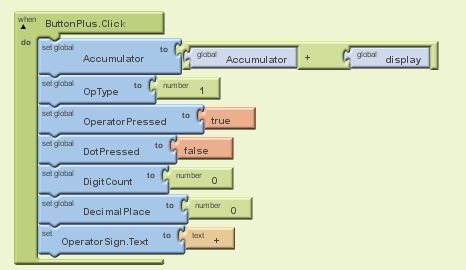
I created a procedure called "buttonpressed" to process the numbers each time the buttons are pressed. See screen captures which are self-explanatory.

(A) Defining the global variables


 (B) Calling the "ButtonPressed" procedure each time a number button is pressed:


  (C) The "ButtonPressed" procedure


(D) Other buttons like the "Plus", "Equal" and "AC" buttons:


Friday, June 3, 2011

More exercises on App Inventor

In the last post, i talked about getting my first android app "Hellopurr" to work. It was really a breeze.
While playing with some ideas, a colleague asked if a short sound clip could be made to sound repeatedly when a button is pressed, and to stop playing the clip when the same button is pressed again.
Writing an "If-then-else" statement in the when.button.click event causes the button to be stuck in an endless loop. The "meow" from the cat kept going on and on non-stop and it triggered some uninvited comments from the boss! I had to quickly reboot the phone to get the "meow" out from the loop. Gosh!

Did some googling and found that the problem can be solved with a button and a clock component.

I don't think i can explain that well enough in words. I have done a screen capture of the blocks editor:


a. A boolean variable "sound" is defined.
b. Under the "do" section of  "when Button1.Click" component, invert the variable "sound". This achieves the toggling function of the button. 
c. Under the "do" section of "when Clock1.Timer" component, a "if-then-else" statement is used. Basically, what it does is, to check the state of the variable "sound". If it is "true", then play the sound clip, if it is "false", then stop it.
d. The clock component will repeat itself every 1000 milliseconds.

First hand on App Inventor


I have never thought that I would be doing this.
Yes, I have done some pascal and c++ programming in my polytechnic and uni days more than 12 years ago. Nothing much on the visual stuffs. So, this is something challenging for me.

While having my usual coffee breaks with my colleagues, I was told about the simplicity of programming an android app using google's very own App Inventor.  If you are interested, you can read about it from here:
http://appinventor.googlelabs.com/learn/gettingstarted.html

There are some tutorials at the site to get you started.

I took me about 15 minutes to the PC and phone set up for some serious development work. :)
Another 15 minutes to get familiarized with the development UI. And 10 minutes for the first android app - "HelloPurr"!

Amazing! Barely an hour to get my first app running on my htc phone without any problem!